


How to Bring Your Project to Life?
Imagine that your “Digital Cookbook” is already fully designed, and autonomous AI agents are just waiting to create recipes from a photo of your fridge. But then you hit a wall: you have a brilliant project, but you don’t know how to make anything actually happen when you click “Generate.”
Don’t worry—this is exactly where ideas turn into real products.
In this chapter, we’ll take a look “under the hood” of the app and explore the three pillars that every modern software application is built on: Frontend (user interface), Backend (the AI agents’ kitchen), and API (the link between them). Remember, though, the golden rule: simplify the process before automating it—even the best AI agent won’t save an app with chaotic foundations.
SPA or MPA—one room or many?
Before you publish your own cookbook, you need to decide in what form you’ll do it. A web application is software that runs directly in the user’s browser, eliminating the need to install anything on the hard drive. Depending on your needs, I’ll show you a few formats so you can choose the one that suits you best:
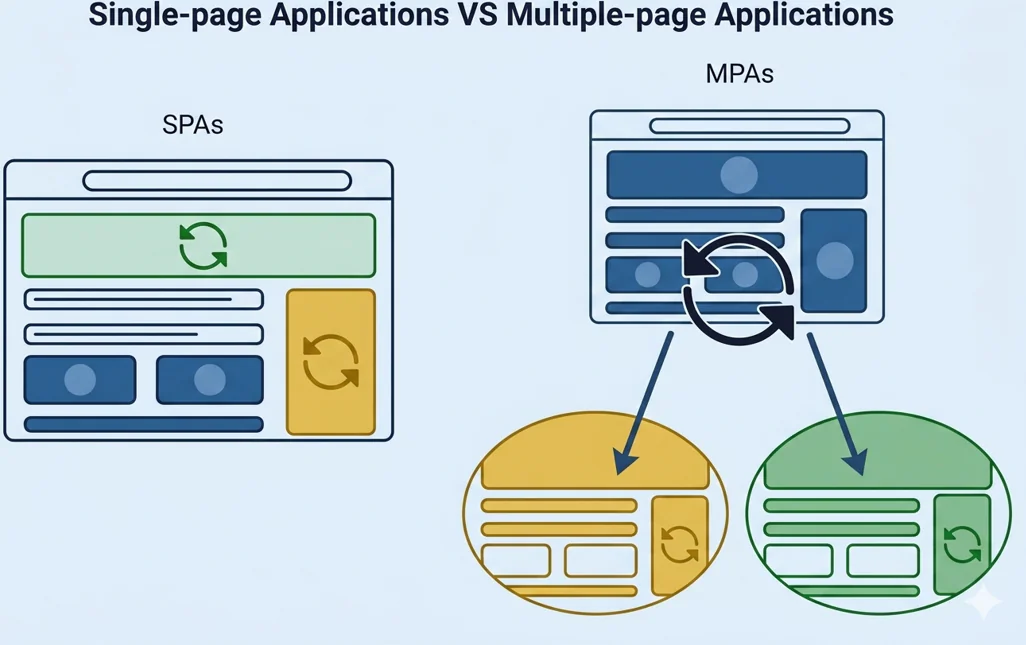
An SPA (Single-Page Application) works like an open kitchen in a restaurant—everything happens in one place. The app loads once, and all subsequent actions, such as browsing recipes or calculating portions, happen instantly, without reloading the screen. The user seamlessly transitions from a photo of the fridge to the finished recipe, without having to wait for a new page to load each time.
MPA (Multi-Page Application) is the classic model—each click fetches a new page from the server, much like moving between different rooms in a restaurant. It works well where there is a lot of content and it’s important for it to be easily found in search engines.
There is no single right answer—the choice depends on what your application is. If you prioritize interactivity and speed, an SPA will be the natural choice. If you’re building a complex website with a large amount of content, an MPA may serve its purpose better. Hybrid approaches that combine the advantages of both are also becoming increasingly common.
Once the architecture is chosen and it’s clear whether the application will exist as a cohesive space or as a collection of separate views—the foundation is ready. This is the moment when sketches turn into code, and design decisions into an actual interface. You can move on to the frontend.
Frontend: A Digital Showcase
This is everything a cook sees when they open the app—a clear layout of ingredients, easy-to-read fonts, and large buttons that are easy to tap even with a greasy thumb. It’s a visual showcase of your recipes, designed to inspire cooking and make navigating the menu a pure pleasure.
In your daily life, you come across front-end design literally every few moments. Whether you’re ordering food over the phone, browsing recipes, checking the weather, or paying for online purchases—each time, someone designed that screen specifically for you. The frontend’s job is to ensure so you don’t have to think about it—that you simply intuitively know what to click and where to look.
In a cooking app, the frontend is particularly important. A cook at the stove doesn’t have time to search for hidden buttons or read small text. Everything must be immediately visible, legible, and easy to use—even with wet or dirty hands. A good frontend in the kitchen isn’t a luxury—it’s a necessity.
Cooking on every device
Imagine this scenario. In the morning, you’re browsing recipes on your laptop in the living room—a large screen, a comfortable chair, peace and quiet. Then you go to the kitchen, pull out your phone, and open the same recipe. The screen looks completely different—the text is larger, the buttons are bolder, the layout is simpler. Everything adjusted automatically. That’s Responsive Design.
Today, people use apps on screens of all different sizes—from a small smartphone to a tablet mounted on the fridge. Responsive Design ensures that the interface recognizes the device it’s running on and instantly adapts, just like water taking the shape of its container.
This is especially important in the kitchen. Hands are wet and busy, and the phone sits on the counter. When buttons are large and text is legible on every screen, the cook can focus on what matters most—cooking.
A smooth frontend is only half the battle. The other half is whether using the app is enjoyable, whether the user intuitively knows what to click, and whether they want to come back. That’s what UI and UX are all about.
Experience Design (UI/UX): Two Ingredients of One Recipe
In your digital cookbook, UI/UX design is the process of creating the perfect “recipe” for collaboration between the chef and technology, where UI is the dish’s aesthetic presentation and UX is its unforgettable flavor.
Here’s how these two elements work together to make your app your favorite kitchen helper:
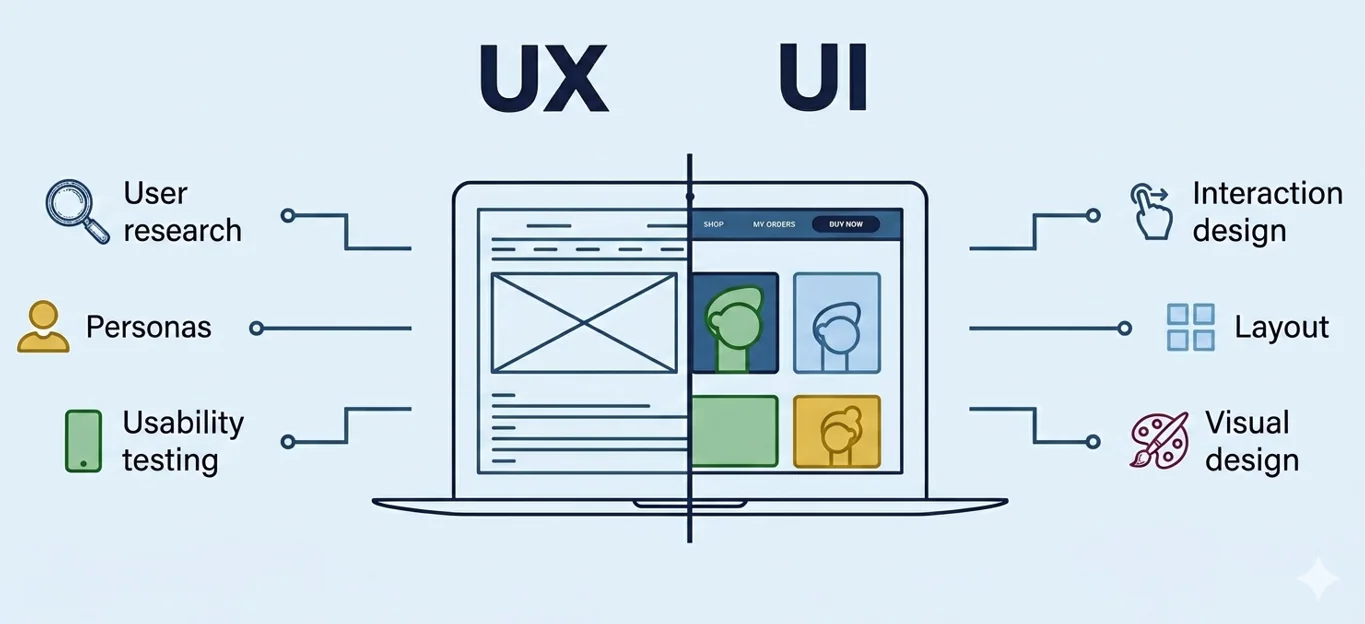
- UI (User Interface) – Usability and Aesthetics: This is the visual layer—everything you see on your phone’s screen. The UI ensures that the typography is legible even from a meter away, that icons are recognizable at a glance, and that buttons are large and clear enough. It’s a “dashboard” that tells you exactly where to click, without any unnecessary hesitation.
- UX (User Experience) – Experience and Fluidity of Operation: UX defines how the user perceives the app and how they navigate it. It’s not just about functionality, but above all about convenience, intuitiveness, and a logical structure of actions. A well-designed UX guides the user step by step, minimizing unnecessary decisions and shortening the path to achieving the goal.
It is crucial to follow the “Don’t Make Me Think” principle, described in Steve Krug’s book Don’t Make Me Think. This means that a well-designed user interface (UI) should be intuitive and understandable without additional explanations, so that the user immediately knows what actions to take and where to click.
Professional Tools: Equipment for Ambitious Chefs
As an application grows, writing the interface from scratch becomes inefficient. This is where ready-made tools come in handy, speeding up the work and improving its quality.
Frameworks are like professional kitchen appliances—they automate repetitive tasks and let you build the interface using ready-made, reusable components. Instead of writing a button or form from scratch every time, you assemble the app like building blocks.
Builders and bundlers are packaging tools—they gather all project files (code, images, styles) and prepare them for delivery to the browser in the most optimized form. Like vacuum-packing ingredients before cooking: everything is in place, nothing gets lost, and the package is as small as possible.
Both types of tools have many variants and are actively evolving—the goal isn’t to know every single one, but to be aware that they exist and that it’s worth using them when the project requires it.
Backend: The Heart of the Kitchen and AI Agents (The Brain of the Application)
The frontend is the dining room—elegant and designed with the guest in mind. But what actually gets the dish onto the table happens behind the closed doors of the kitchen. That kitchen is the backend.
It’s a space invisible to the user, where all the magic happens. When the chef clicks “Suggest a Recipe,” the frontend sends a signal—and the backend receives it, processes it, and sends back a response. This is where a photo of the fridge turns into a list of ingredients, and the list of ingredients into a ready-to-use recipe. This is where autonomous AI agents work, user data is managed, and all the app’s business logic is executed.
The backend is the invisible yet crucial pillar of the app—this is where user requests are routed to the appropriate AI agents, which process them into valuable culinary responses.
A well-designed backend works like an invisible kitchen team: the guest never sees what’s happening behind the scenes—but always feels the result in the form of a perfectly tailored recipe. The frontend and backend are two sides of the same coin: one without the other makes no sense. Their communication is enabled by a third pillar—the API.
Communication: The Digital Waiter (API Connector)
Mechanisms for data exchange between the interface and the server with AI agents.
API Interface: Gateway to the System
Imagine that the frontend of your Cookbook is a restaurant dining room, and the backend with AI agents is the kitchen. The API (Application Programming Interface) acts as a waiter—it takes an order from a guest (user), brings it to the kitchen (server), and returns with the finished dish (the agent’s response).
Without the API, the two sides couldn’t communicate with each other—it’s this link that ensures clicking the “Suggest a Recipe” button on the screen sets the entire server-side AI agent system in motion.
Communication Standards: The Waiter’s Languages
The waiter must speak a language understandable to both the guest and the kitchen.
REST (Representational State Transfer)—today’s dominant standard, lightweight and intuitive. Communication is based on simple URLs and HTTP methods:
- GET /recipes – “Show me all recipes”
- POST /recipes – “Add a new recipe”
- GET /agent/substitutes?ingredient=butter – “Ask the agent for butter substitutes”
Data is exchanged in JSON format—readable by both humans and machines.
The Request-Response Cycle: User-AI Agent Interaction
This is the heart of all communication in the Cookbook—a two-step dialogue between the user interface and server-side AI agents.
Request: An Order Placed with the Waiter
When a user takes a photo of the contents of their fridge and clicks “Suggest a Recipe,” the frontend sends a structured HTTP request to the server. It consists of several key elements:
Headers – order metadata: who the user is, what format they’re sending data in, and what response format they expect:
Content-Type: application/json

Authorization: Bearer <token_użytkownika>

Accept-Language: pl-PL
Request Body – the actual content of the request in JSON format, containing a Base64-encoded photo of the refrigerator (since JSON only transmits text, not files) and the user’s preferences:
{
  "image": "data:image/jpeg;base64,/9j/lalalala...",
 "preferences": {
 "diet": "wegetariańska",
 "allergies": ["gluten", "orzechy"],
"max_time": 30
 },
"language": "pl
}
It is this data package that the waiter (API) delivers directly to the appropriate AI agent—in this case, the Ingredient Recognition Agent, which is the first to analyze the photo.
Response: Ready-to-Serve Dish
After the request is processed by the chain of AI agents—the Ingredient Recognition Agent identifies the ingredients, and the Recipe Agent selects the best dish—the server returns an HTTP response with the final result:Status Code – the first feedback, even before the user sees the recipe:
- 200 OK – everything went according to plan, recipe ready
- 400 Bad Request – the photo was too dark, the agent couldn’t recognize the ingredients
- 429 Too Many Requests – the user exceeded the limit on requests to AI agents
- 500 Internal Server Error – something went wrong on the kitchen side
Response Body – the finished recipe generated by the AI in JSON format:
{
 "status": "success",
  "recipe": {
"title": "Frittata z warzywami",
"time": 25
 "difficulty": "łatwy",
"ingredients": [
      { "name": "jajka", "amount": 4, "unit": "szt." },
     { "name": "papryka", "amount": 1, "unit": "szt." },
      { "name": "cukinia", "amount": 0.5, "unit": "szt." }
  ],
"steps": ["Pokrój warzywa...", "Rozbij jajka..."],
"agent_notes": "Wykryto 8 składników. Przepis dopasowany do diety wegetariańskiej."
  }
}
Without an API, AI agents would be brilliant chefs locked in a kitchen with no window to serve dishes—great, but useless. It is this digital waiter that turns a photo of an empty fridge into a ready-made dinner recipe. Good communication is half the battle for any restaurant—and any app.
Summary
Frontend, backend, and API are the three inseparable pillars of every modern application—and while the user sees only the tip of this iceberg, it is what lies beneath the surface that determines whether the application runs like a Swiss watch or a broken microwave.
Each layer contributes something essential: the frontend invites the user to interact and makes the experience intuitive, the backend manages AI agents and processes data into valuable responses, and the API ties these two worlds together into a single, seamless flow of information. Choosing the right technologies at every level—from the framework to the cloud model—is a strategic decision that impacts the scalability, security, and future of the entire project.
But every good kitchen needs one more thing: a pantry. AI agents can recognize ingredients and suggest recipes—but how do they know which recipes already exist? What are a given user’s preferences? What was cooked last week? The answer lies in the data—and that’s exactly what the next chapter will cover.
Materials
Self-study materials that are related to this topic:
- Types of websites
- Frontend – introduction
- Frontend development tools (Webpack, Vite, etc.)
- UI/UX – design basics
- Backend – introduction
- API – what it is and how it works
- REST API – basics
- HTTP – basic information
- Connecting frontend with backend
- The first secret of great design
- How the web works
- What is backend
- API – what it is and how it works
- Technologies for building websites
- What is frontend
- UI/UX design basics