


Introduction
You already understand what artificial intelligence is and how it works. Choosing the right tool is half the battle. To create a “chef” in your restaurant, a language model is a good starting point: you send it a photo, and it generates a recipe. But there’s a better approach — one built on top of LLMs: AI agents.
Since we already have a tool we can interact with using natural language, we can take it a step further. We can enable it to plan actions, make decisions, and execute tasks. That’s exactly what we call an agent. Instead of manually sending a photo, requesting a recipe, and then correcting errors, you can build an agent that processes the image, generates a recipe, lists ingredients, and even verifies its own output. This represents one of the highest levels of automation in software development.
What Do AI Agents Look Like Under the Hood?
Want to build your own, but not sure where to start? Before you begin coding, you need to understand the core concepts behind how agents work. These are the fundamental building blocks of every agent:
Prompt: What Should the Agent Do?
Simply put – a prompt is an instruction given to the AI.
A well-crafted prompt is half the success — a poorly formulated one can do more harm than good. The model needs to know exactly what it is trying to achieve, and the expected output must be clearly defined! A good prompt specifies:
- Goal: what the model should do
- Scope: the domain or context of the task
- Constraints: what the agent must avoid or is not allowed to do
- Quality criteria: what defines a good result
There are also different types of prompts. The most important one is the system prompt, which defines the agent’s overall behavior and rules. Then there’s the user prompt, which represents the specific instruction given by the user. These two do not conflict with each other. The system prompt defines global behavior, constraints, and response structure, while the user prompt defines the task. A good practice is to first write your prompt yourself, then refine it using an LLM. Language models are very effective at improving prompts, helping you standardize and enhance their quality. If you encounter issues while building your agent, feed them back into the model to iteratively improve your prompt.
When you send data to an AI model, the text is converted into tokens. A token is a basic unit of text mapped to a number — computers process numbers, not words. When working with LLMs, you pay for tokens, and the same applies to outputs — the model returns tokens as well. More tokens generally lead to better results, but also higher cost. That said, you don’t need to worry too much about limits — modern models can process tens of thousands of words. It’s worth repeating: AI does not understand language — it predicts patterns based on it.
A good prompt is usually detailed, often including examples, constraints, and sometimes even structured formats. You must clearly define the agent’s role and responsibilities. In the context of a cookbook application, you might specify: “You are a chef in a high-end restaurant” or “You specialize in Italian cuisine.” Without this, the model operates without context, which often leads to irrelevant or low-quality responses.
A well-designed prompt also helps reduce “hallucinations”. By providing clear boundaries and examples, you limit the model’s tendency to generate unrelated or incorrect information.
Examples of bad prompt:
“Write a recipe for chicken pasta.”
The agent will complete the task without any issues, but the result will be very generic. The generated recipe may be stylistically correct, but it won’t be particularly useful in practice. It lacks constraints, output structure, and context — the model doesn’t know whether it’s supposed to act as a chef, a waiter, or even a pilot.
Przykład dobrego promptu:
“Generate a recipe with the following constraints:
- Dish: chicken pasta
- Servings: 2
- Maximum ingredient cost: 30 PLN
- Preparation time: ≤ 30 minutes
- Style: Mediterranean cuisine
- Use grams or milliliters only
- Include macronutrients per serving (calories, proteins, fat, carbs)
- Return the result as a step-by-step list
This kind of instruction clearly defines the scope of the task, introduces constraints, and establishes the expected output structure. The model knows not only what to do, but also the boundaries it operates within and what the result should look like. The difference between a good and a bad prompt is not about execution, but about control over the outcome. A well-designed prompt reduces randomness and significantly improves the usefulness of the response.
State: Short-Term Memory
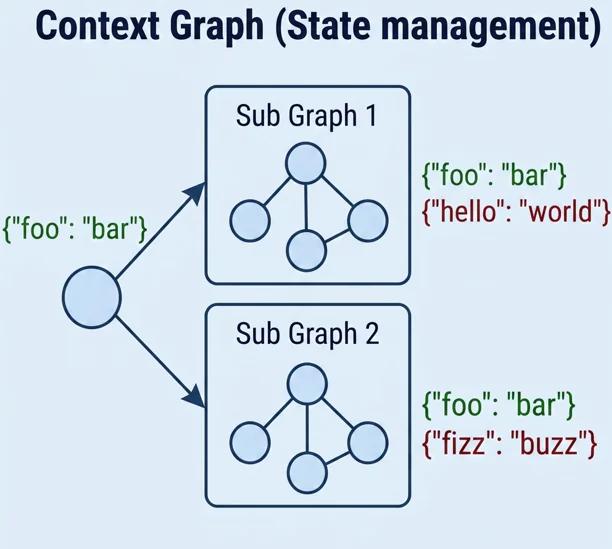
Agents need to pass data between steps. To do this, you define a structure (state) that nodes use to communicate. Each node processes data and passes the result to the next one. You can store multiple types of state depending on your needs. But you need to remember the key is consistency
This is short-term memory, meaning it exists only within a single execution. If you ask the agent about a previous image from an earlier request, it won’t remember — that data is gone.
In the example below, I’ve defined a very simple State in which the agent operates in two modes and tracks whether an image has been provided.
@dataclass
class State(MessagesState):
  mode: Literal["analyse_image”, “extract_recipe”]
  has_image: Boolean
Node: What the Agent Does
From a technical perspective, agents operate as graphs. Nodes represent specific actions performed at each step. A node can call a language model, save a conversation to a file, perform calculations — you are only limited by what your system can handle. The key idea is simple: a node is where the agent performs an action.
In the example below, I’ve defined a simple node where the agent interacts with a language model. The System prompt defines its behavior.
def example_node(state: State):

    message = state["messages"][-1]

    SYSTEM_PROMPT = "You are a helpful chef assistant. Answer user questions”

    system = SystemMessage(SYSTEM_PROMPT)
    response = ai_model.invoke([system, message])
    return {"messages": [response]}
Edge: How the Agent Makes Decisions
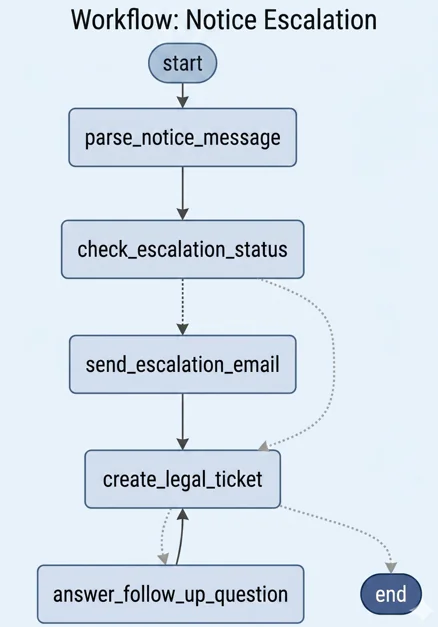
The second element of the graph is edges. Their role is to define transitions between nodes. They can be simple or conditional. In a conditional flow, the agent has multiple possible paths and typically selects one based on a given condition. In the cooking assistant example, the agent might choose to analyze an image if one is provided, or generate a recipe if it receives text. Keep in mind: the graph should remain simple because unnecessary complexity negatively affects the agent’s behavior.
Below is a simple edge that demonstrates this mechanism. The Agent checks whether it received an image and selects the appropriate Node.
def edge_router(state: State) -> Literal["analyse_image”, “extract_recipe”]:
    if state[“has_image”]:
        return “analyse_image”
    return “extract_recipe”
Memory: How the Agent Remembers the User
To make the agent useful across interactions, you need long-term memory. This allows it to retain conversation history. There are multiple ways to implement this. The simplest approach is grouping interactions by user. More advanced options include storing conversations in a database or saving summaries in text files.
It’s important to structure the data properly — the agent must distinguish between users and conversations, and be able to access this information when needed. For example, the agent should remember that a user is allergic to nuts and avoid suggesting them.
When using LangGraph, you can use the Memory saver () object to persist the agent’s state across executions. Conversations are stored in separate threads, allowing multiple users to interact with the agent simultaneously.
A more traditional approach is storing history in a database. This requires more effort but gives you full control over how data is stored and retrieved. After each step, the state is saved, and on subsequent runs, it is loaded again.
Another approach commonly used with agents is RAG (Retrieval-Augmented Generation). This is not a traditional database, but a knowledge retrieval system. The model searches external data sources before generating a response, giving you control over what information is used.
Tools: The Foundation of Autonomy
The final key concept is tools used by agents. These are simply functions with descriptions that the agent can call. The agent determines what data it needs, understands what the function does based on its description, and executes it. The function then returns a result, which the agent processes and summarizes.
This allows the agent to interact with the outside world. What does this mean in practice?
The Agent can decide on its own whether to analyze an image or generate a list of ingredients. If it receives an image, it calls an image-processing tool. If the user wants to save a recipe, it calls a file-saving function. Tools should be as simple as possible and perform a single task.
In the previous chapter, the MVP included analyzing images from a fridge and generating recipes. In the example below, the agent can use a tool to perform this task.
@tool
def tool_image(query: str, image_url: str) -> str:
    """Parses image with LLM.
    """

    SYSTEM_PROMPT = "You are a chef, when user uploads image derive it's recipe"

    user_message = query
    content = [
        {"type": "text", "text": user_message},
        {"type": "image_url", "image_url": {"url": image_url}},
    ]
    messages = [SystemMessage(SYSTEM_PROMPT), HumanMessage(content=content)]

    response = llm.invoke(messages)
    return response.content
Tools for Building Agents
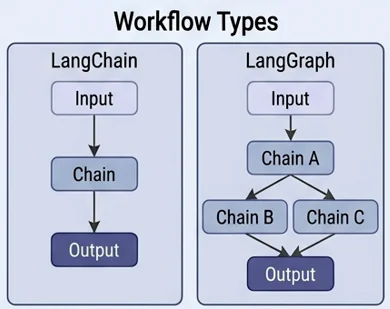
If you’re ready to start building your own agent, one of the best tools available is LangGraph. It is an open-source framework designed specifically for building AI agents. It provides ready-to-use components for defining nodes, edges, tools, state, and memory. You can use built-in data structures or extend them to fit your needs. LangGraph supports both Python and TypeScript/JavaScript.
Another tool worth mentioning is LangChain. It is also used for building agents, but follows a step-by-step execution model. Unlike LangGraph, it does not provide the same flexibility for defining conditions, branching logic, or loops. LangChain is easier to use but less powerful, making it a good fit for simpler agents.
What Makes LangGraph Different?
When building an agent with LangGraph, you define its decision-making process as a graph. The traditional approach: Prompt → LLM → Output — does not allow the agent to make decisions on its own. It requires manually handling control flow and offers limited control. With a graph-based approach, you can introduce conditions, improve reliability, and give the agent greater autonomy.
Chain: The Simplest Agent
The simplest possible agent is a sequence of nodes connected in order — the output of one node becomes the input for the next. Each node is responsible for a single task. In practice, this is just a chain of operations. For example, an agent might:
- Analyze an image of a dish
- Generate a recipe based on the extracted ingredients
- Save the data to a file
- Send it to a server
- Summarize everything for the user
This process always runs in the same order, as a single execution flow. If one step fails, the entire chain breaks. A chain-based agent is the best starting point when building your first agent.
Router: The Agent Makes Decisions
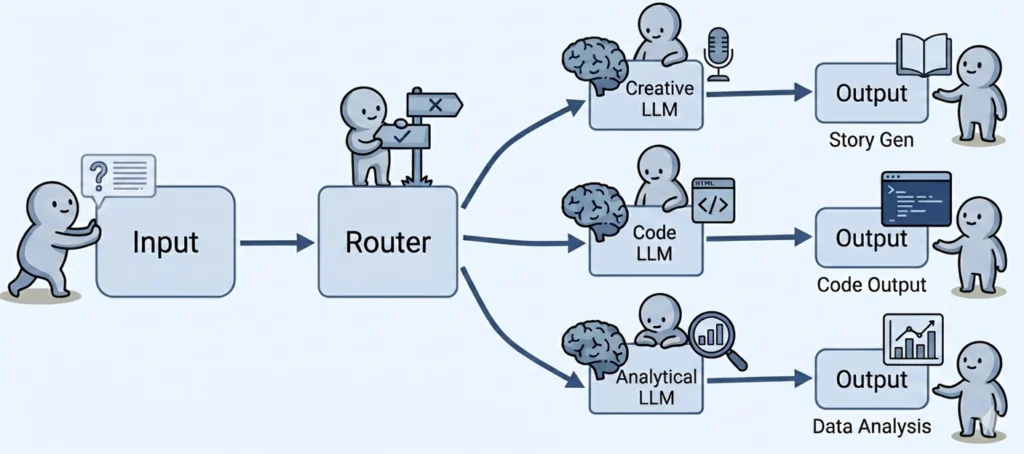
This pattern uses a single node as a dispatcher. It receives input and decides which specialized node should handle the task. As a result, independent branches are created within the graph, sometimes leading to different outputs. There is no looping the node selects a single linear path.
In the case of a recipe management agent, we can define 3 possible paths:
- Analyze an image
- Generate a recipe
- Describe the ingredients from a recipe
At runtime, the router may receive an image, ingredients, or a recipe. Based on the input, it decides where to route the request:
- If it receives an image, it should be analyzed
- If it receives a recipe, the agent extracts the ingredients
- If it receives ingredients, the agent generates a recipe
SubGraph: An Agent Within an Agent
This approach is similar to functions or objects in traditional programming. You create an isolated graph that appears as a single node from the outside. The main graph has no knowledge of its internal structure — it simply invokes it and waits for the result. This makes it easy to replace, reuse in different parts of the system, or test independently before integrating it into the main graph.
In the kitchen analogy, a SubGraph can represent a dedicated section, such as a pastry station. The head chef delegates dessert preparation without needing to know how the pastry section operates internally — only whether it delivers the final dish.
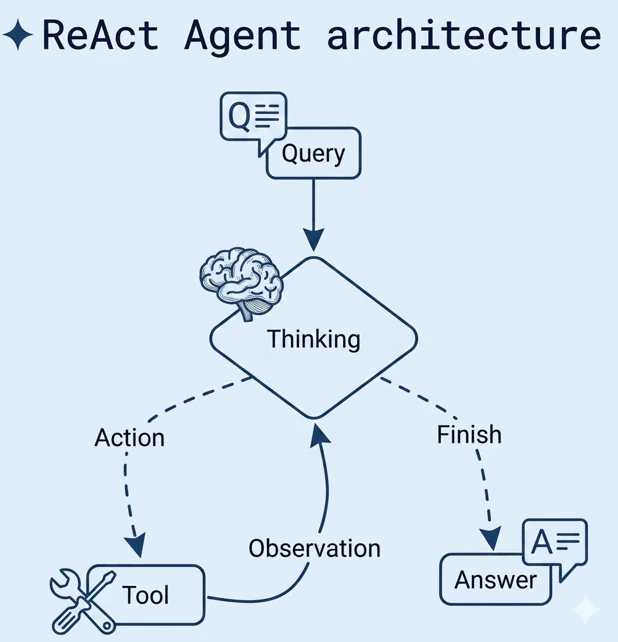
ReAct: The First Step Toward Autonomy
The agent analyzes the situation it is given and takes an appropriate action (for example, by invoking a specific tool). Based on the result, it evaluates the outcome and continues the process, repeating this cycle until it considers the task complete. This type of agent is typically equipped with well-defined tools, such as:
- Convert ingredients into a recipe
- Extract ingredients from an image
This is the first step toward full automation. An autonomous “chef” no longer relies on a predefined algorithm it can explore, adapt, and experiment on its own.
Summary
Choosing the right models and building agents allows you to modernize your application. You now understand which approaches are appropriate and which are best avoided in the early stages. Your cookbook is no longer just a static collection of recipes with the help of an agent, it can actively create them.
You also know which tools to use when building an agent and understand the core concepts behind them. At this point, it’s a matter of putting the pieces together effectively. In the next chapter, we will focus on improving the visual layer of your MVP. Once your solution works and meets its goals, it also needs to be visually appealing, adaptable to different users and devices, and easy to use.
However, while designing a polished dining area (the frontend), you must not forget about the chefs (AI agents) and the kitchen (the backend). The next chapter will guide you through how the entire restaurant the (complete web application) should function as a cohesive system.
Materials
Self-study materials that are related to this topic:
- Best Practices for API Key Safety
- How can I keep my OpenAI accounts secure?
- How AI agents work (logic of AI agents)
- Difference between LangChain and LangGraph
- Examples of good prompts
- How to write good prompts
- LangChain documentation
- Basics of LangGraph
- Tutorial: using LangSmith
- Guide to building an AI agent
- LangGraph complete course for beginners – complex AI agents with Python
- What are AI agents